Gratis · Senza registrazione · Funziona nel tuo browser
Aggiungi una filigrana alla tua immagine.
L'immagine resta tua.
Trascina una foto, sposta il tuo testo o logo esattamente dove vuoi e esporta. Niente viene caricato su un server, e niente di nostro finisce sul tuo file.
Vuoi ripristinare la tua precedente configurazione della filigrana? Le tue foto non sono mai state salvate — solo i segni che hai creato.
Batch — 0 immagini
Una filigrana, ogni immagineAdvertisement
Come applicare una filigrana a un'immagine
-
01
Carica la tua immagine
JPG, PNG, WebP or GIF. Paste straight from your clipboard, or add up to 60 photos at once for a batch.
-
02
Aggiungi il tuo segno
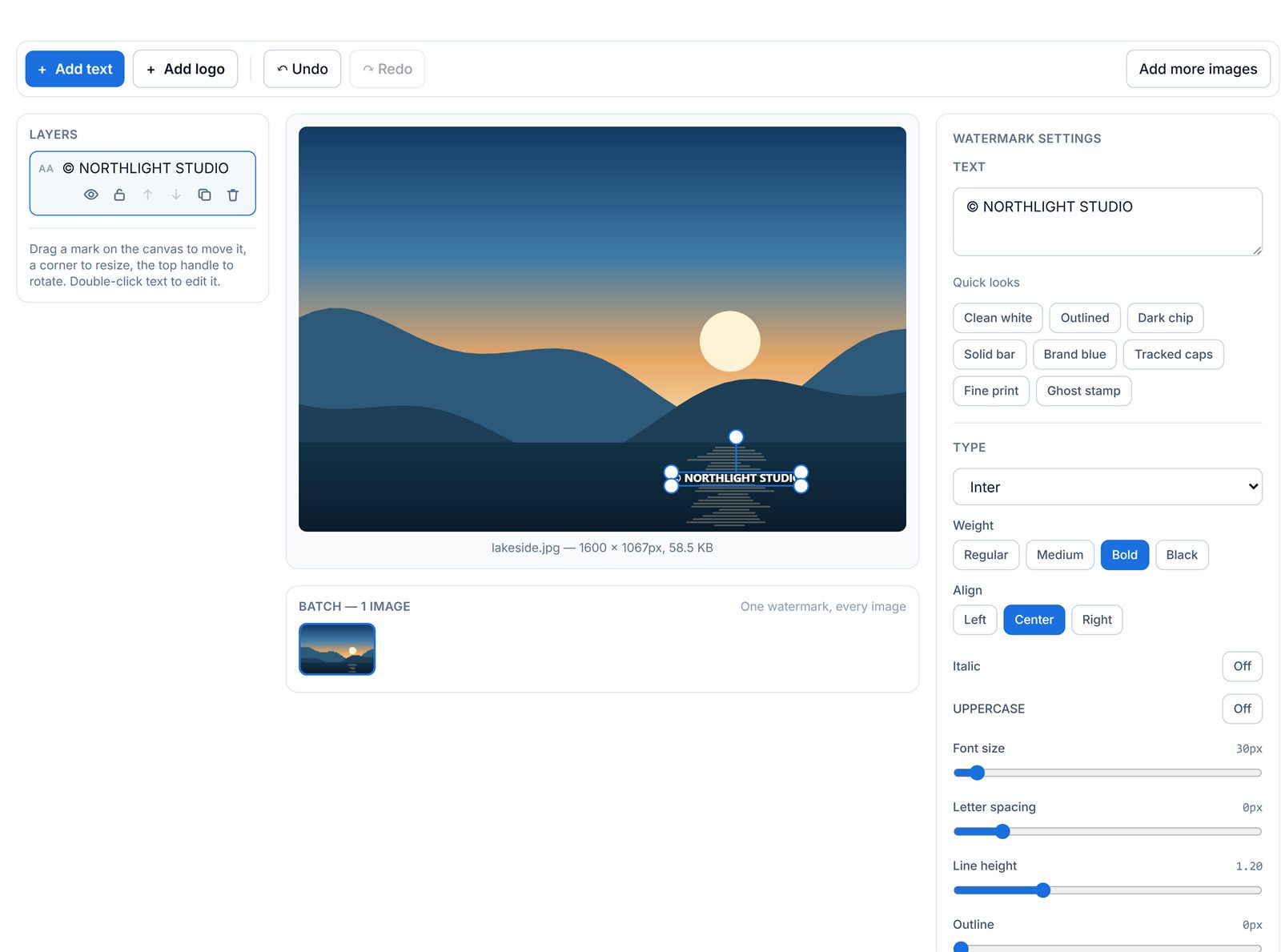
Type your text or drop in a logo, then drag it anywhere, resize from a corner, and rotate from the handle above it. Or tile it across the whole picture.
-
03
Esporta le tue immagini
Scarica one image, or the entire batch as a ZIP, as JPG, PNG or WebP at whatever quality you choose.
Position it properly, not into a preset corner
Most free watermark tools give you nine fixed positions and a size slider. That is fine until your subject is standing in the bottom-right corner. Here the mark is a real object: drag it anywhere, including partly off the edge, rotate it to any angle, and stack as many as you need — a logo in one corner, a URL in the other, a faint tiled pattern across the middle. The nine-point grid is still there as a shortcut, and it just writes the same position any drag would.
One setup, a whole folder of photos
A watermark is stored as a proportion of the frame rather than as a pixel coordinate, which is what makes a batch work when the photos are not all the same size. Place a mark 6% in from the bottom-right on a 4000 × 3000 original, and it lands 6% in from the bottom-right on the 1080 × 1080 crop next to it — at a proportional size, not a fixed pixel one. Set it up once and export the ZIP.
What’s different here
Watermarking is the one job where a tool’s own branding on your export defeats the purpose.
| Typical free editor | Questo strumento | |
|---|---|---|
| Aggiunge il proprio logo al tuo export | Often, on the free plan | Never |
| Carica il tuo file su un server | Usually | No — rendered on your device |
| Account required | Often | No |
| Limite di esportazione o piano a pagamento | Common | None |
| Posizionamento e rotazione liberi | Often nine fixed spots | Anywhere, any angle |
Ultima revisione: agosto 2026. Based on the published free tiers of widely-used online watermark editors as of August 2026. Free-tier terms change — check the current pricing page of any tool you are comparing.
Everything in the editor
Filigrane di testo
Thirteen font families, weight, italics, uppercase, letter spacing, line height, colour, outline, shadow and a box behind the text — plus eight one-click looks.
Logo watermarks
Drop in a PNG, JPG or WebP. Transparent PNGs work exactly as you would hope, and the checkerboard behind the canvas shows you where the transparency is.
Posizionamento libero
Drag, resize from any corner, rotate with snapping at 15° steps, and nudge with the arrow keys. Marks snap to the centre and margin lines as you drag.
Tiled patterns
Repeat a mark across the whole picture with independent horizontal and vertical spacing, its own rotation, and alternate-row offset so it does not read as a table.
Livelli
Stack as many marks as you like. Hide, lock, duplicate, reorder or delete each one. Locking is how you stop nudging a mark you have already placed.
Annulla e ripeti
Sixty steps of history, with Ctrl+Z and Ctrl+Shift+Z. A whole drag is one step, not two hundred, and selecting a layer is not a step at all.
Elaborazione in batch
Up to 60 images at once. Reorder them, drop any of them, preview any of them, then export the lot as a ZIP with real progress and a working cancel button.
Touch and pinch
One finger drags a mark, two fingers resize and rotate it. On a phone the panels become tabs under the canvas instead of a squeezed desktop layout.
Nothing leaves the tab
Rendering happens on a canvas in this page. Your watermark setup is remembered locally so a refresh does not lose it — your photos deliberately are not.
Advertisement
FAQ sulla filigrana immagine
Le mie foto vengono caricate su un server?
No. Watermarking runs entirely in your browser using canvas rendering. Your images stay on your device — there is no upload step, no queue and no server-side copy.
Questo strumento aggiunge il proprio logo alla mia immagine?
No. Only the text or logo watermark you add appears on your export. Nothing of ours is stamped on your file, on any plan, because there are no plans.
Posso applicare una filigrana a un batch di foto insieme?
Yes. Set up your watermark once, then export the whole batch as a ZIP. Because the watermark is positioned as a proportion of the frame rather than in pixels, one setup lands in the same relative place on photos of different sizes.
Come aggiungo una filigrana trasparente a una foto?
Drop in a transparent PNG logo, or add a text mark, then lower the Opacity slider. Around 25 to 40 percent is readable without competing with the picture. A tiled mark at low opacity is harder to crop out than a single corner mark.
Quale formato dovrei esportare?
JPG for photographs you are publishing, WebP if you want the same quality in a smaller file and your destination accepts it, and PNG when the image itself has transparency you need to keep. PNG files will be considerably larger.
La filigrana ridurr? la qualit? della mia immagine?
The watermark itself is drawn at full resolution, so it costs nothing in sharpness. Re-encoding a JPG does lose a little, which is why the quality slider defaults to 90 — high enough that the loss is invisible at normal viewing sizes.
Questo strumento pu? rimuovere una filigrana invece di aggiungerla?
No — this tool is for adding your own watermark. Removing someone else’s watermark is a different job and, if the content is not yours, usually a copyright problem.
Funziona su telefono?
Yes. Drag with one finger to move a mark and pinch with two to resize and rotate it. The settings, layers and export panels become tabs under the canvas rather than a shrunken version of the desktop sidebars.
Need to watermark a video instead? The video watermark tool uses the same editor and adds a timeline, so you can decide exactly when your mark appears and disappears.
Advertisement